今回は、Pause/Resume、 Mute/Unmute、 Start Recording 、 Save as 機能を追加しました。
開発環境
前回と同じです。
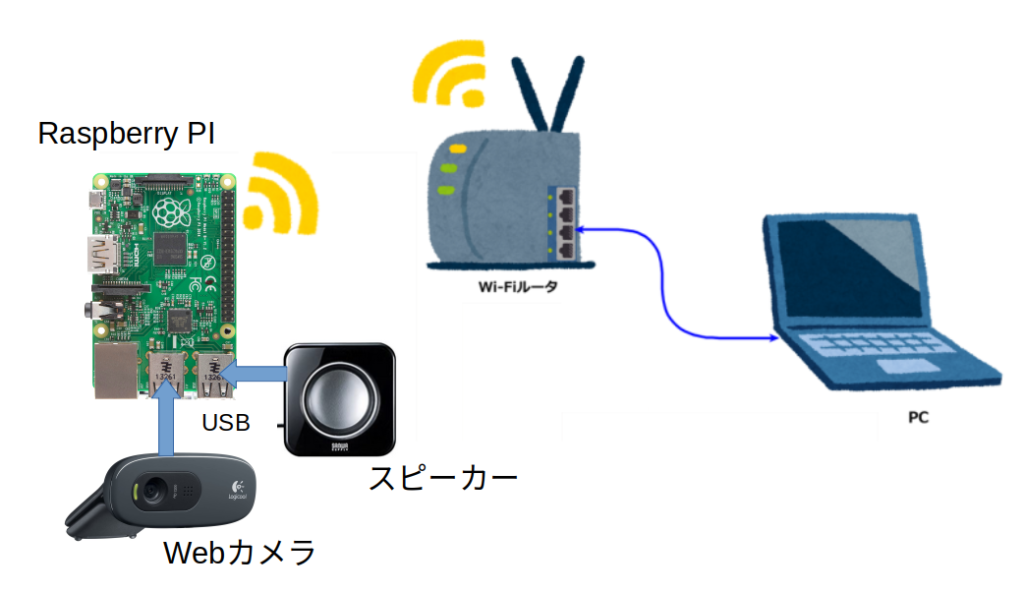
- ルータの下にRaspberry PI(3 model B+) とPCが接続
- Raspberry PI には、USBのWebカメラとスピーカーが接続。
- PCのOSは、Ubuntus 20 LTS。 Raspberry PIのOSは、OS Lite(32-bit)。
- WebブラウザはFireFox 90.0
Web画面とプログラムの説明
前回の画面に、Pause/Resume、 Mute/Unmute、 Start Recording 、 Save as ボタンを追加しています。
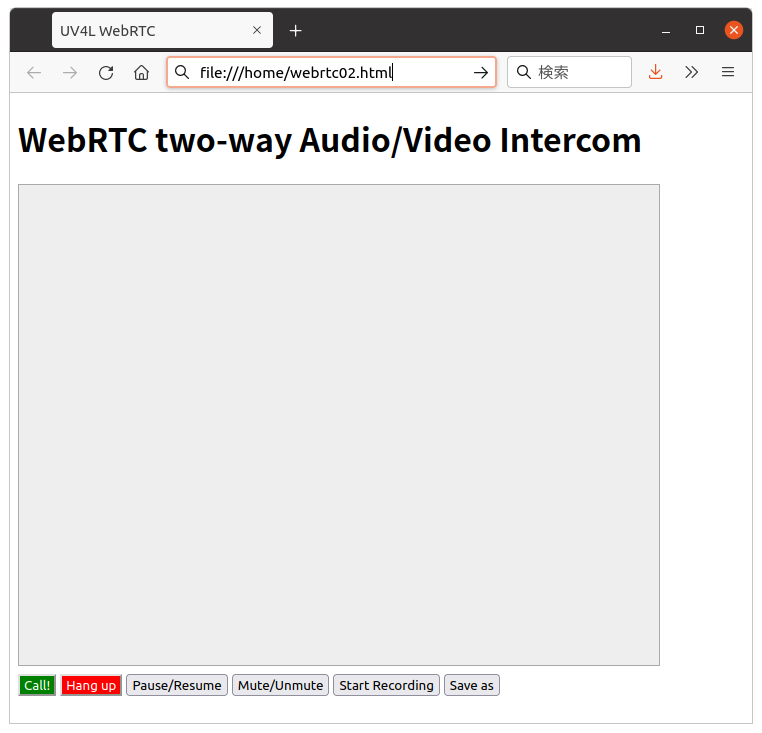
オリジナルHPのソースコードに有った関数で、各ボタンと関数の対応は以下の通り。
| ボタン | 関数 |
|---|---|
| Pause/Resume | pause() |
| Mute/Unmute | mute() |
| Start Recording | start_stop_record() |
| Save as | download() |
コードは以下の通り。前回からの追加分は203行以降です。
webrtc02.html
<!DOCTYPE html>
<html>
<head>
<meta charset="UTF-8">
<title>UV4L WebRTC</title>
<script type="text/javascript">
var ws = null;
var pc;
var audio_video_stream;
var mediaConstraints = {
optional: [],
mandatory: {
OfferToReceiveAudio: true,
OfferToReceiveVideo: true
}
};
var iceCandidates = [];
var recorder = null;
function createPeerConnection() {
try {
pc = new RTCPeerConnection();
pc.onicecandidate = onIceCandidate;
pc.ontrack = onTrack;
pc.onremovestream = onRemoteStreamRemoved;
console.log("peer connection successfully created!");
} catch (e) {
console.error("createPeerConnection() failed");
}
}
function onIceCandidate(event) {
if (event.candidate && event.candidate.candidate) {
var candidate = {
sdpMLineIndex: event.candidate.sdpMLineIndex,
sdpMid: event.candidate.sdpMid,
candidate: event.candidate.candidate
};
var request = {
what: "addIceCandidate",
data: JSON.stringify(candidate)
};
ws.send(JSON.stringify(request));
} else {
console.log("End of candidates.");
}
}
function addIceCandidates() {
iceCandidates.forEach(function (candidate) {
pc.addIceCandidate(candidate,
function () {
console.log("IceCandidate added: " + JSON.stringify(candidate));
},
function (error) {
console.error("addIceCandidate error: " + error);
}
);
});
iceCandidates = [];
}
function onTrack(event) {
console.log("Remote track!");
var remoteVideoElement = document.getElementById('remote-video');
remoteVideoElement.srcObject = event.streams[0];
}
function onRemoteStreamRemoved(event) {
var remoteVideoElement = document.getElementById('remote-video');
remoteVideoElement.srcObject = null;
remoteVideoElement.src = ''; // TODO: remove
}
function start() {
if ("WebSocket" in window) {
document.getElementById("stop").disabled = false;
document.getElementById("start").disabled = true;
document.documentElement.style.cursor = 'wait';
var protocol = location.protocol === "https:" ? "wss:" : "ws:";
ws = new WebSocket(protocol + '//raspberrypi.local:8090/stream/webrtc');
ws.onopen = async function () {
iceCandidates = [];
remoteDesc = false;
audio_video_stream = await navigator.mediaDevices.getUserMedia({video: false, audio: true});
createPeerConnection();
audio_video_stream.getTracks().forEach(track => pc.addTrack(track, audio_video_stream));
var request = {
what: "call",
options: {
force_hw_vcodec: false,
vformat: "30",
trickle_ice: true
}
};
ws.send(JSON.stringify(request));
console.log("call(), request=" + JSON.stringify(request));
};
ws.onmessage = function (evt) {
var msg = JSON.parse(evt.data);
if (msg.what !== 'undefined') {
var what = msg.what;
var data = msg.data;
}
console.log("message =" + what);
switch (what) {
case "offer":
pc.setRemoteDescription(new RTCSessionDescription(JSON.parse(data)),
function onRemoteSdpSuccess() {
remoteDesc = true;
addIceCandidates();
console.log('onRemoteSdpSucces()');
pc.createAnswer(function (sessionDescription) {
pc.setLocalDescription(sessionDescription);
var request = {
what: "answer",
data: JSON.stringify(sessionDescription)
};
ws.send(JSON.stringify(request));
console.log(request);
}, function (error) {
alert("Failed to createAnswer: " + error);
}, mediaConstraints);
},
function onRemoteSdpError(event) {
alert('Failed to set remote description (unsupported codec on this browser?): ' + event);
stop();
}
);
break;
case "iceCandidate": // when trickle is enabled
if (!msg.data) {
console.log("Ice Gathering Complete");
break;
}
var elt = JSON.parse(msg.data);
let candidate = new RTCIceCandidate({sdpMLineIndex: elt.sdpMLineIndex, candidate: elt.candidate});
iceCandidates.push(candidate);
if (remoteDesc)
addIceCandidates();
document.documentElement.style.cursor = 'default';
break;
}
};
ws.onclose = function (evt) {
if (pc) {
pc.close();
pc = null;
}
document.getElementById("stop").disabled = true;
document.getElementById("start").disabled = false;
document.documentElement.style.cursor = 'default';
};
ws.onerror = function (evt) {
alert("An error has occurred!");
ws.close();
};
} else {
alert("Sorry, this browser does not support WebSockets.");
}
}
function stop() {
if (audio_video_stream) {
try {
if (audio_video_stream.getVideoTracks().length)
audio_video_stream.getVideoTracks()[0].stop();
if (audio_video_stream.getAudioTracks().length)
audio_video_stream.getAudioTracks()[0].stop();
audio_video_stream.stop(); // deprecated
} catch (e) {
for (var i = 0; i < audio_video_stream.getTracks().length; i++)
audio_video_stream.getTracks()[i].stop();
}
audio_video_stream = null;
}
document.getElementById('remote-video').srcObject = null;
document.getElementById('remote-video').src = ''; // TODO; remove
if (pc) {
pc.close();
pc = null;
}
if (ws) {
ws.close();
ws = null;
}
document.getElementById("stop").disabled = true;
document.getElementById("start").disabled = false;
document.documentElement.style.cursor = 'default';
}
function mute() {
var remoteVideo = document.getElementById("remote-video");
remoteVideo.muted = !remoteVideo.muted;
}
function pause() {
var remoteVideo = document.getElementById("remote-video");
if (remoteVideo.paused)
remoteVideo.play();
else
remoteVideo.pause();
}
function handleDataAvailable(event) {
//console.log(event);
if (event.data && event.data.size > 0) {
recordedBlobs.push(event.data);
}
}
function stop_record() {
if (recorder) {
recorder.stop();
console.log("recording stopped");
document.getElementById('record').innerHTML = 'Start Recording'
recorder = null;
}
}
function startRecording(stream) {
recordedBlobs = [];
var options = {mimeType: 'video/webm;codecs=vp9'};
if (!MediaRecorder.isTypeSupported(options.mimeType)) {
console.log(options.mimeType + ' is not Supported');
//options = {mimeType: 'video/webm;codecs=vp8'};
options = {mimeType: 'video/webm;codecs=vp8,opus'};
if (!MediaRecorder.isTypeSupported(options.mimeType)) {
console.log(options.mimeType + ' is not Supported');
options = {mimeType: 'video/webm;codecs=h264'};
if (!MediaRecorder.isTypeSupported(options.mimeType)) {
console.log(options.mimeType + ' is not Supported');
options = {mimeType: 'video/webm'};
if (!MediaRecorder.isTypeSupported(options.mimeType)) {
console.log(options.mimeType + ' is not Supported');
options = {mimeType: ''};
}
}
}
}
try {
recorder = new MediaRecorder(stream, options);
} catch (e) {
console.error('Exception while creating MediaRecorder: ' + e);
alert('Exception while creating MediaRecorder: ' + e + '. mimeType: ' + options.mimeType);
return;
}
console.log('Created MediaRecorder', recorder, 'with options', options);
recorder.ondataavailable = handleDataAvailable;
recorder.onwarning = function (e) {
console.log('Warning: ' + e);
};
recorder.start();
console.log('MediaRecorder started', recorder);
}
function start_stop_record() {
if (pc && !recorder) {
var streams = pc.getRemoteStreams();
if (streams.length) {
console.log("starting recording");
startRecording(streams[0]);
document.getElementById('record').innerHTML = 'Stop Recording';
}
} else {
stop_record();
}
}
function download() {
if (recordedBlobs !== undefined) {
var blob = new Blob(recordedBlobs, {type: 'video/webm'});
var url = window.URL.createObjectURL(blob);
var a = document.createElement('a');
a.style.display = 'none';
a.href = url;
a.download = 'video.webm';
document.body.appendChild(a);
a.click();
setTimeout(function () {
document.body.removeChild(a);
window.URL.revokeObjectURL(url);
}, 100);
}
}
</script>
<style>
video {
background: #eee none repeat scroll 0 0;
border: 1px solid #aaa;
}
</style>
</head>
<body>
<h1><span>WebRTC two-way Audio/Video Intercom</span></h1>
<video id="remote-video" autoplay="" width="640" height="480">
Your browser does not support the video tag.
</video><br>
<button id="start" style="background-color: green; color: white" onclick="start();">Call!</button>
<button disabled id="stop" style="background-color: red; color: white" onclick="stop();">Hang up</button>
<button type=button id="pause" onclick="pause();" title="pause or resume local player">Pause/Resume</button>
<button type=button id="mute" onclick="mute();" title="mute or unmute remote audio source">Mute/Unmute</button>
<button type=button id="record" onclick="start_stop_record();" title="start or stop recording audio/video">Start Recording</button>
<button type=button id="download" onclick="download();" title="save recorded audio/video">Save as</button>
</body>
</html>
- 203から206行: function mute() {
- Mute/Unmuteボタンが押されるとこの関数を実行。
- remoteVideo.muted : muteを管理する変数。 !remoteVideo.muted; でmuteを管理。
- 208から214行: function pause() {
- Pause/Resumeボタンが押されとこの関数を実行。
- if (remoteVideo.paused)で状態を判断し、
- remoteVideo.play();(再生)。remoteVideo.pause();(停止)
- 268行: function start_stop_record() {
- Start Recordingボタンが押されとこの関数を実行。
- このボタンは録画の開始と終了を兼ねています。
- 録画開始時
- ボタン表示を’Stop Recording’。startRecording()を実行。
- 録画終了時
- ボタン表示を’Start Recording’。 stop_record() を実行。
- 281から296行: function download() {
- Save asボタンが押されるとこの関数を実行。
- 録画したデータのダウンロードを行う。
- 313行: Pause/Resumeボタンの追加
- 314行: Mute/Unmuteボタンの追加
- 315行: Start Recordingボタンの追加
- 316行: Save asボタンの追加
プラグラムの確認
- Raspberry PI側:
- 前回の ”音声を送る(3)” と同じ
- PC側:
- 今回のHTMLコードを、”webrtc02.html”としてPCに保存。
- PCのFireFoxを使って実行。
- 実行:
- FireFoxのURL欄にコードのPathを入力する
- (ファイルエクスプローラーで、”webrtc02.html”をダブルクリックする)
- 確認は以下で行えます。
- Call ボタンを押す
- メディアの使用許可が表示されるので許可を選択
- Stramingが始まるまで待つ
- Pause/Resumeボタンを押してStreamingが停止、再開することを確認
- Mute/Unmuteボタンを押して音声がオンオフすることを確認
- Start Recordingボタン押して録画を開始。ボタンが Stop Recording に変わる
- しばらくして、Stop Recordingを押して録画を終了。
- Save asボタンを押して録画したファイルをダウンロードする。
- FireFoxのURL欄にコードのPathを入力する
新しいHP画面を作って見ました
これらの機能を使ってインターフォンらしくHPの画面を変更しました。プログラムは、intercom.html、intercom.js、intercom.cssの3つ。これらをフォルダに保存し、intercom.htmlをダブルクリックするとアプリが起動します。
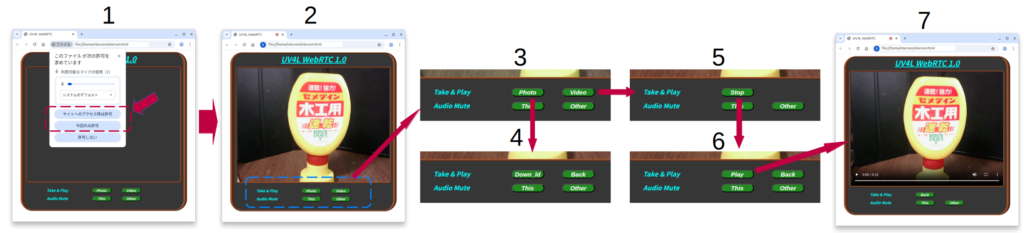
動作の説明
- アプリが起動直後の画面
- 立ち上げ時マイクの使用許可聞かれます。
- ”サイトへのアクセス時は許可”または”今回のみ許可”を選択。
- Streaming画面が表示されます。
- これが基本画面です。
- 画面に下に操作メニューが有ります。
- 基本画面の操作メニュー
- Take&Play
- Photoボタン Snapshotとそのダウンロード
- Videoボタン Stremingの録画と再生、ダウンロード
- Audio Mute
- This: 自分にマイクにオンオフ
- Other:相手のマイクのオンオフ
- Muteがオンになるとボタンが赤になります。
- Take&Play
- Photoボタン メニュー
- ”3”で”Photo”ボタンを押すとこのメニューが表示されます。
- 画面には押した時点のSnapshotが表示されます。
- ”Down_ld”ボタンを押すとSnapshotがダウンロードされます。
- Videoボタン メニュー1
- ”3”で”Video”ボタンを押すとSteamingの録画が開始し、この画面が表示されます。
- ”Stop”ボタンが押されると録画が停止します。
- Videoボタン メニュー2
- ”5”で”Stop”ボタンを押すとこの画面が表示されます。
- ここで、”Play”ボタンを押すと録画再生用のアプリが立ち上がります。
- 録画再生用のアプリ
- 録画した内容をここで確認出来ます。
- ”4”,”5”,”6”,”7”にある”Back”ボタンを押せば”2”の基本画面に戻ります。
<!DOCTYPE html>
<html>
    <head>
        <meta charset="UTF-8">
        <link rel='stylesheet' type='text/css' href='./intercom.css' >
        <title>UV4L WebRTC</title>
    </head>

    <body>
        <div class='b_frame'>
   	        <div class='t_font'><u>UV4L WebRTC 1.0</u></div>

            <div class='p_frame'>
                <video id="remote-video" autoplay="" width="640" height="480"> </video>
                <video id="play-video" controls style='display:none'>Your browser does not support the video tag.</video>
            </div>

            <div class="_menu">
               <div class="input-group">
                    <label>Take & Play</label>
                    <button type='button' id='photo' onclick="take_photo();">Photo</button>
                    <button type='button' id='record' onclick="rec_video();">Video</button>
                    <button type='button' id='stp_rec' style="display:none" onclick="stop_rec();">Stop</button>
                    <button type='button' id='pt_dn' style="display:none" onclick="dn_photo();">Down_ld</button>
                    <button type='button' id='play_v' style="display:none" onclick="play_video();">Play</button>
                    <button type='button' id='back' style="display:none" onclick="_back();">Back</button>
                    <br>
                    <label>Audio Mute</label>
                    <button type='button' id='mute_me' onclick='mute_me();'>This</button>
                    <button type='button' id='mute_other' onclick='mute_other();'>Other</button><br>
                    <canvas style='display:none'></canvas>
                </div>
            </div>
        </div>

        <script src='./intercom.js'></script>
    </body>
</html>
let ws = null;
let pc;
let audio_video_stream;
let recorder = null;
let aa_streams = [];
let mediaConstraints = {
    optional: [{echoCancellation: true}],
    mandatory: {
        OfferToReceiveAudio: true,
        OfferToReceiveVideo: true
    }
};
let iceCandidates = [];
let remoteVideo = document.getElementById("remote-video");
let recordedBlobs = [];
let disp_buf = ['photo', 'record', 'stp_rec', 'pt_dn', 'play_v', 'back'];

start();

function createPeerConnection() {
    try {
        pc = new RTCPeerConnection();
        pc.onicecandidate = onIceCandidate;
        pc.ontrack = onTrack;
        pc.onremovestream = onRemoteStreamRemoved;
        console.log("peer connection successfully created!");
    }
    catch (e) {
        console.error("createPeerConnection() failed");
    }
}

function onIceCandidate(event) {
    if (event.candidate && event.candidate.candidate) {
        var candidate = {
            sdpMLineIndex: event.candidate.sdpMLineIndex,
            sdpMid: event.candidate.sdpMid,
            candidate: event.candidate.candidate
        };
        var request = {
            what: "addIceCandidate",
            data: JSON.stringify(candidate)
        };
        ws.send(JSON.stringify(request));
    }
    else {
        console.log("End of candidates.");
    }
}

function addIceCandidates() {
    iceCandidates.forEach(function (candidate) {
        pc.addIceCandidate(candidate,
            function () {
                console.log("IceCandidate added: " + JSON.stringify(candidate));
            },
            function (error) {
                console.error("addIceCandidate error: " + error);
            }
        );
    });
    iceCandidates = [];
}

function onTrack(event) {
    console.log("Remote track!");
    var remoteVideoElement = document.getElementById('remote-video');
    remoteVideoElement.srcObject = event.streams[0];
    aa_streams[0] = event.streams[0];
}

function onRemoteStreamRemoved(event) {
    var remoteVideoElement = document.getElementById('remote-video');
    remoteVideoElement.srcObject = null;
    remoteVideoElement.src = ''; // TODO: remove
}

async function start() {
    if ("WebSocket" in window) {
        var protocol = location.protocol === "https:" ? "wss:" : "ws:";
        ws = new WebSocket(protocol + '//rasp.local:8090/stream/webrtc');
        ws.onopen = async function () {
            iceCandidates = [];
            remoteDesc = false;
            audio_video_stream = await navigator.mediaDevices.getUserMedia({video: false, audio: true});
            createPeerConnection();
            audio_video_stream.getTracks().forEach(track => pc.addTrack(track, audio_video_stream));
            var request = {
                what: "call",
                options: {
                    force_hw_vcodec: false,
                    vformat: "30",
                    trickle_ice: true
                }
            };
            ws.send(JSON.stringify(request));
            console.log("call(), request=" + JSON.stringify(request));
        };

        ws.onmessage = function (evt) {
            var msg = JSON.parse(evt.data);
            if (msg.what !== 'undefined') {
                var what = msg.what;
                var data = msg.data;
            }
            console.log("message =" + what);

            switch (what) {
                case "offer":
                    pc.setRemoteDescription(new RTCSessionDescription(JSON.parse(data)),
                        function onRemoteSdpSuccess() {
                            remoteDesc = true;
                            addIceCandidates();
                            console.log('onRemoteSdpSucces()');
                            pc.createAnswer(function (sessionDescription) {
                                pc.setLocalDescription(sessionDescription);
                                    var request = {
                                        what: "answer",
                                        data: JSON.stringify(sessionDescription)
                                    };
                                    ws.send(JSON.stringify(request));
                                    console.log(request);

                                }, function (error) {
                                    alert("Failed to createAnswer: " + error);

                                }, mediaConstraints);
                            },
                            function onRemoteSdpError(event) {
                                alert('Failed to set remote description (unsupported codec on this browser?): ' + event);
                                stop();
                            }
                    );
                    break;

                case "iceCandidate": // when trickle is enabled
                    if (!msg.data) {
                        console.log("Ice Gathering Complete");
                        break;
                    }
                    var elt = JSON.parse(msg.data);
                    let candidate = new RTCIceCandidate({sdpMLineIndex: elt.sdpMLineIndex, candidate: elt.candidate});
                    iceCandidates.push(candidate);
                    if (remoteDesc)
                        addIceCandidates();
                    document.documentElement.style.cursor = 'default';
                    break;
            }
        };

        ws.onclose = function (evt) {
            if (pc) {
                pc.close();
                pc = null;
            }
            document.documentElement.style.cursor = 'default';
        };

        ws.onerror = function (evt) {
            alert("An error has occurred!");
            ws.close();
        };

    }
    else {
        alert("Sorry, this browser does not support WebSockets.");
    }
}

function mute_other() {
    remoteVideo.muted = !remoteVideo.muted;
    if (remoteVideo.muted){
        document.getElementById("mute_other").style.backgroundColor = 'red';
    }
    else{
        document.getElementById("mute_other").style.backgroundColor = '#228b22';
    }
}

function mute_me() {
    audio_video_stream.getAudioTracks()[0].enabled = !audio_video_stream.getAudioTracks()[0].enabled;
    if (audio_video_stream.getAudioTracks()[0].enabled){
        document.getElementById('mute_me').style.backgroundColor = '#228b22';
    }
    else{
        document.getElementById("mute_me").style.backgroundColor = 'red';
    }
}

function rec_video() {
    let buf = [0, 0, 1, 0, 0, 0];
    set_disp(buf);

    recordedBlobs = [];
    var options = {mimeType: 'video/webm;codecs=vp9,opus'};
    if (!MediaRecorder.isTypeSupported(options.mimeType)) {
        console.log(options.mimeType + ' is not Supported');
        //options = {mimeType: 'video/webm;codecs=vp8'};
        options = {mimeType: 'video/webm;codecs=vp8,opus'};
        if (!MediaRecorder.isTypeSupported(options.mimeType)) {
            console.log(options.mimeType + ' is not Supported');
            options = {mimeType: 'video/webm;codecs=h264'};
            if (!MediaRecorder.isTypeSupported(options.mimeType)) {
                console.log(options.mimeType + ' is not Supported');
                options = {mimeType: 'video/webm'};
                if (!MediaRecorder.isTypeSupported(options.mimeType)) {
                    console.log(options.mimeType + ' is not Supported');
                    options = {mimeType: ''};
                }
            }
        }
    }

    try {
        recorder = new MediaRecorder(aa_streams[0], options);
    }
    catch (e) {
        console.error('Exception while creating MediaRecorder: ' + e);
        alert('Exception while creating MediaRecorder: ' + e + '. mimeType: ' + options.mimeType);
        return;
    }
    console.log('Created MediaRecorder', recorder, 'with options', options);
    recorder.ondataavailable = handleDataAvailable;
    recorder.onwarning = function (e) {
        console.log('Warning: ' + e);
    };
    recorder.start();
    console.log('MediaRecorder started', recorder);
 }

function stop_rec() {
    let buf = [0, 0, 0, 0, 1, 1];
    set_disp(buf);
    if (recorder) {
        recorder.stop();
        console.log("recording stopped");
        document.getElementById('record').innerHTML = 'Video';
        recorder = null;
    }
}

function handleDataAvailable(event) {
    //console.log(event);
    if (event.data && event.data.size > 0) {
        recordedBlobs.push(event.data);
    }
}

function play_video() {
    console.log('Play video');
    let buf = [0, 0, 0, 0, 0, 1];
    set_disp(buf);
    remoteVideo.style.display = "none";
    remoteVideo.pause();
    remoteVideo.muted = true;
    document.getElementById('play-video').style.display = "inline";

    var superBuffer = new Blob(recordedBlobs, {type: 'video/webm'});
    var recordedVideoElement = document.getElementById('play-video');
    recordedVideoElement.src = URL.createObjectURL(superBuffer);
}

function dn_photo(){
    var canvas = document.querySelector('canvas');
    var url = canvas.toDataURL('image/jpeg', 1.0);
    var a = document.createElement('a');
    a.style.display = 'none';
    a.href = url;
    a.download = get_time() + ".jpg";
    document.body.appendChild(a);
    a.click();
    setTimeout(function () {
    document.body.removeChild(a);
        window.URL.revokeObjectURL(url);
    }, 100);
}

function take_photo() {
    let buf = [0, 0, 0, 1, 0, 1];
    set_disp(buf);

    remoteVideo.pause();
    var canvas = document.querySelector('canvas');
    canvas.width = remoteVideo.videoWidth;
    canvas.height = remoteVideo.videoHeight;
    canvas.getContext('2d').drawImage(remoteVideo, 0, 0, canvas.width, canvas.height);
}

function set_disp(buf){
    let a= 0;
    let str;

    disp_buf.forEach(element => {
            str = 'none';
            if(buf[a] == 1) str = 'inline';
            document.getElementById(element).style.display = str;
            a ++;
        }
    );
}

function _back() {
    let buf = [1, 1, 0, 0, 0, 0];
    set_disp(buf);
    document.getElementById('play-video').style.display = "none";
    remoteVideo.style.display = "inline";
    remoteVideo.play();
    remoteVideo.muted = false;
}

function get_time() {
    var now = new Date();
    var mt = now.getMonth();
    mt += 1;
    now = now.getFullYear() + '-' + mt + '-' + now.getDate() + '_'
         + now.getHours() + '-' + now.getMinutes() + '-' + now.getSeconds();
    console.log(now);
    return now;
}
@charset "UTF-8";

.t_font {
        font-size: 32px;
        font-weight: bold;
        font-style: italic;
        text-align: center;
        color: #0ff;
}

.b_frame {
        width: 670px;
        background: #363636;
        border-radius: 50px;
        border-style: ridge;
        border-width: 5px 15px;
        border-color: sienna;
        margin: 0 auto
}

.p_frame {
        width: 644px;
        height: 480px;
        background: #363636;
        border-radius: 10px;
        border-style: ridge;
        border-width: 5px;
        border-color: sienna;
        margin:  10px auto;
        text-align: center;
}

button {
        display: inline;
        margin: 6px 20px;
        line-height: 15px;
	width: 80px;
        font-size: 15px;
        font-weight: bold;
        font-style: italic;
        cursor: pointer;
        color: #fff;
        background: #228b22;
        border-radius: 20px;
	text-align: center;
        padding-left: 4px;
}

.input-group>label {
        display: inline-block;
        font-size: 16px;
        font-weight: bold;
        font-style: italic;
        padding-left: 15px;
        min-width: 25%;
        color: #0ff;
        margin-left: 80px;
}

._menu {
        display: block;
        flex-wrap: nowrap;
        min-width: 450px;
        background: #363636;
        border-radius: 4px;
        margin: 15px auto 30px;
}
注): intercom.jsファイル 81行 ws = new WebSocket(protocol + ‘//rasp.local:8090/stream/webrtc’); の
”rasp.local” には自分の環境にあったアドレスを使用して下さい。
次は
この状態で玄関先に置けば既にインターフォンとして使えそうです。次回はこれにさらに機能(例えば暗くなったら電灯を点ける、不在時の録画機能等)を追加して行きたいと思います。